Sapphire 26.2 is a focused release designed to help you work faster, reduce manual effort and increase confidence in your outputs. From design and detailing through to manufacturing and business management, this release delivers practical enhancements that improve efficiency, accuracy and day-to-day usability.
Headlining the release are four significant improvements that address real-world challenges faced by fabricators and detailers across Australia and New Zealand.
Key Improvements in 26.2
Web Bracing Now Visible on Truss Layouts
One of the most requested enhancements for the Australian and New Zealand market is finally here.
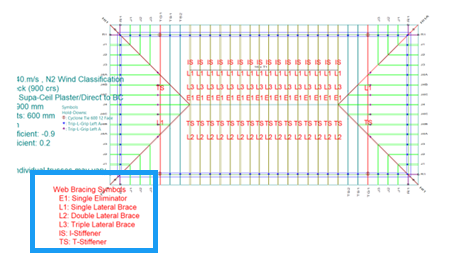
Web bracing information, including brace type, location, member assignment and required material, is now automatically displayed directly on truss layout views. A moveable legend and full visibility controls ensure drawings remain clear and easy to read, while configurable layers, colours and font sizes allow layouts to be tailored to your business standards.
What this means for you:
- Eliminates the need to manually add web bracing information to layouts
- Reduces the risk of missed or incorrect bracing requirements
- Speeds up design review and manufacturing handover
- Provides clearer information for production teams and builders on site
- Helps bridge a long-standing gap with legacy MiTek 20/20 workflows
Smarter Nog Dimensioning for Stepped Bottom Plates
Detailing wall panels with stepped bottom plates just became significantly easier.
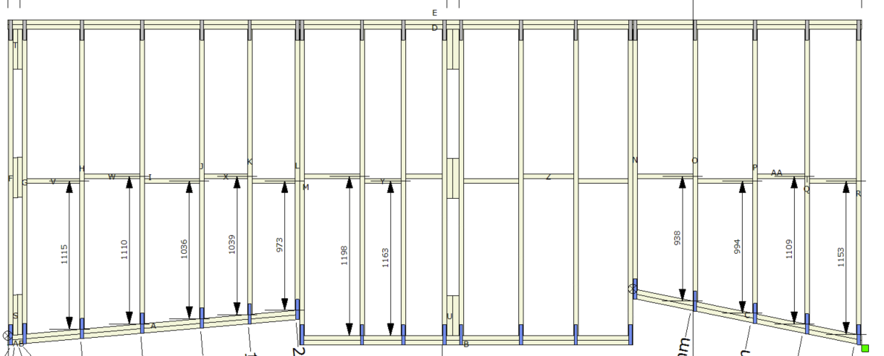
Sapphire now automatically calculates nog dimensions for every section or zone within a panel. Users can choose whether dimensions are measured from the top or underside of the bottom plate to suit manufacturing equipment and operational preferences. The functionality supports single plates, multiple plates, Very Bottom Plate (VBP) configurations and sloped or raked conditions.
What this means for you:
- Reduces repetitive manual dimensioning
- Improves accuracy across complex wall panel designs
- Produces outputs better aligned with manufacturing requirements
- Minimises rework and checking
- Speeds up detailing workflows
Schedule-Based Archive and Purge
Keep your system running efficiently without the manual administration.
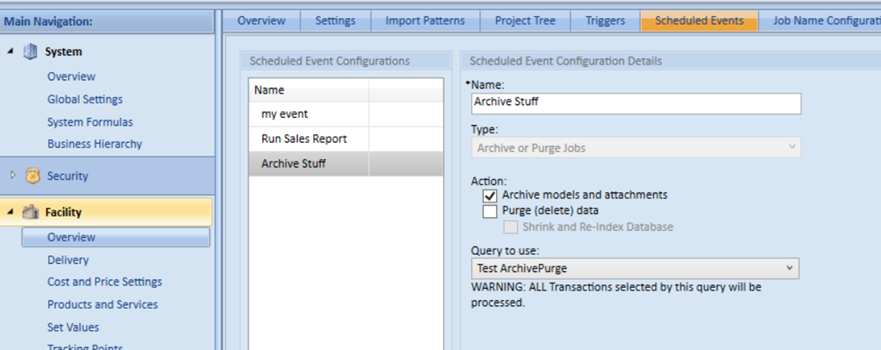
Sapphire Management now allows businesses to automatically archive or purge completed jobs and files based on user-defined schedules and criteria. By removing outdated information from active databases, businesses can maintain better system performance and reduce the burden of ongoing database management.
What this means for you:
- Improves application performance as databases grow
- Reduces database and file system clutter
- Minimises manual housekeeping tasks
- Reduces backup sizes and maintenance overhead
- Supports long-term scalability and system health
New Webbing Options for PosiStrut F-Frames
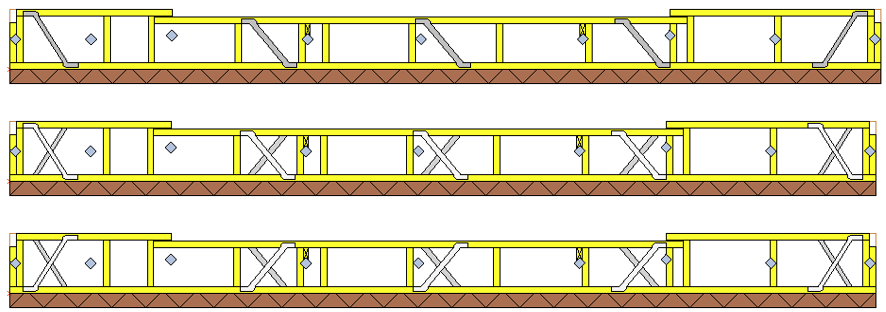
Gain greater control over material usage and manufacturing efficiency.
Manufacturers can now choose from Left Webs, Right Webs or Both Webs when configuring PosiStrut F-Frame gable webbing. The new setting can be applied at Job Default, Manage Job or individual truss level, providing flexibility across projects and production requirements.
This enhancement directly addresses a common manufacturing challenge by allowing businesses to make better use of available stock, including stockpiled right-hand half webs.
What this means for you:
- Better utilisation of existing inventory
- Reduced material waste
- Greater flexibility across projects
- Improved manufacturing efficiency
- More control over production outcomes
Additional Improvements
Ceiling Plane Spacing Method Now Editable
The Spacing Method material loading setting is now visible and editable directly at the ceiling plane level, making it easier to review and modify ceiling configurations without navigating through material templates
Benefits:
- Improved design visibility
- Faster configuration changes
- Greater control over suspended ceiling designs
Beam Interference Now Raised as a Warning
Beam interference through the vertical web at the heel of a high-end truss is now raised as a Warning rather than an Information message.
Benefits:
- Greater design confidence
- Earlier identification of potential issues
- Reduced risk of manufacturing and site rework
Consistent Beam Dimension Display
Generic beam dimensions now display consistently as Depth × Width throughout Sapphire, aligning with all other beam types and creating greater consistency across material lists and reports.
Benefits:
- Improved consistency across outputs
- Reduced potential for interpretation errors
- Cleaner reporting and documentation
Management Enhancements
Improved Delivery Note Visibility
A new option in System Admin allows businesses to choose how delivery notes are displayed in Gadgets and Calendars, either as truncated text or full note content.
Benefits:
- Greater visibility of important information
- Improved flexibility for different workflows
- No disruption to existing user preferences
Clearer Filter Visibility in Grids
Active filters within grids are now highlighted more prominently, making it immediately obvious when filtering is being applied.
Benefits:
- Reduces confusion when locating jobs
- Minimises unnecessary support requests
- Improves day-to-day usability
Built on Stability and Reliability
Alongside these feature enhancements, Sapphire 26.2 includes a significant number of performance improvements, bug fixes and stability updates across both Structure and Management.
The result is a more reliable platform that helps teams spend less time troubleshooting and more time designing, detailing and manufacturing with confidence.
Sapphire 26.2 delivers practical improvements where they matter most — reducing manual work, improving accuracy and helping your business operate more efficiently every day.